


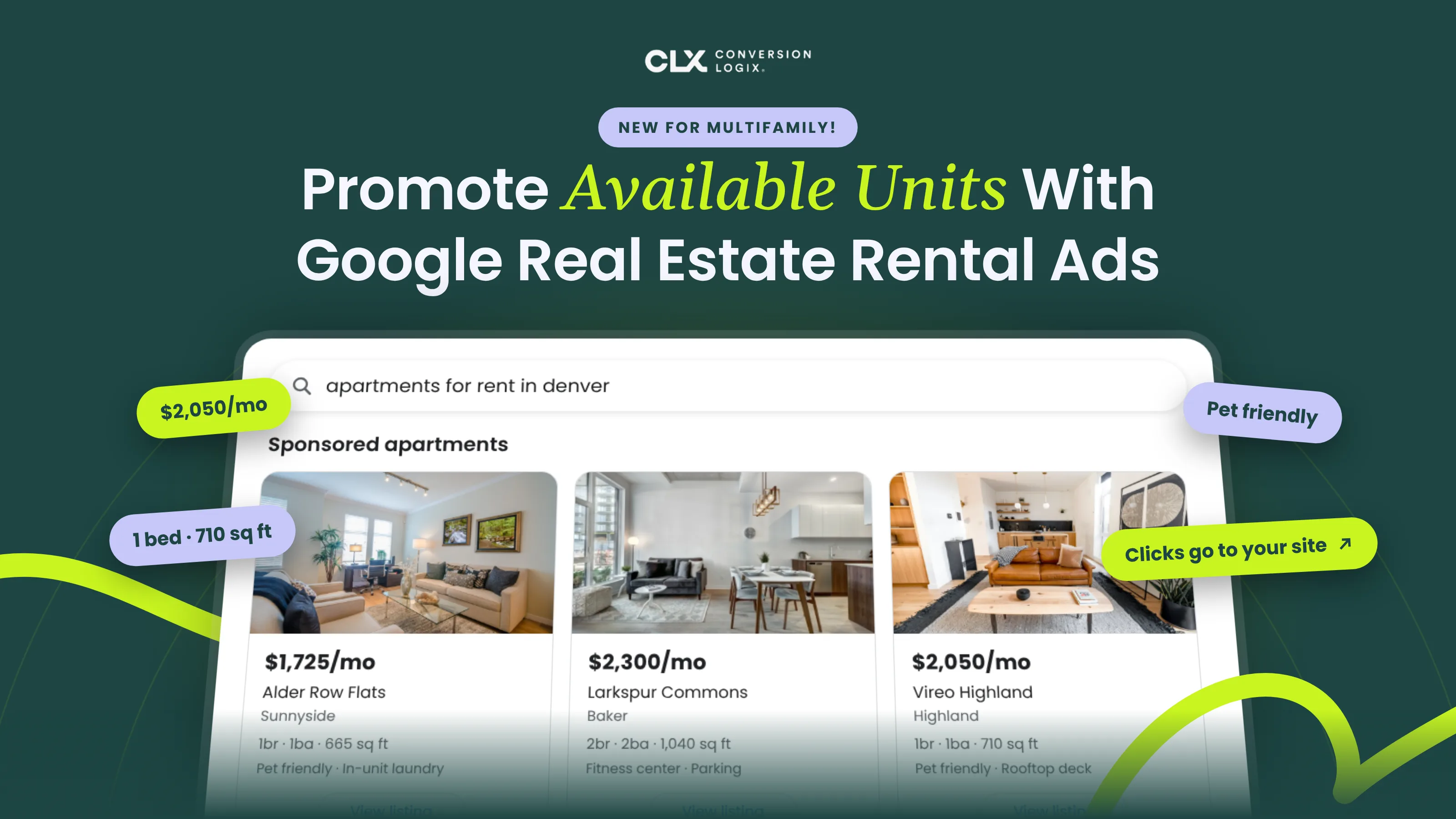
Renters are about to compare apartments on Google before they ever click on a website. Google is testing a new ad format that turns the top of an apartment search into a set of listings. Conversion Logix is one of a small group of partners selected for Google’s limited beta.
Google Real Estate Rental Ads are a new Shopping-style ad format that features individual available apartment units in Google Search results, with a photo, monthly rent, the property’s name and location, floor plan details, and amenities. The ads run on a unit-level inventory feed and can direct renters straight to that unit’s page on the property website.
Below, we cover what this ad format will look like, where these ads fit alongside the campaigns you already run, and what we’re testing during the beta.
What Are Google Real Estate Rental Ads?
Google Real Estate Rental Ads (also called Google Rental Ads) are not a new kind of text ad. They’re closer to Google Shopping ads: instead of a headline and description, the renter sees a scrollable carousel of listing cards under a “Sponsored apartments” label.
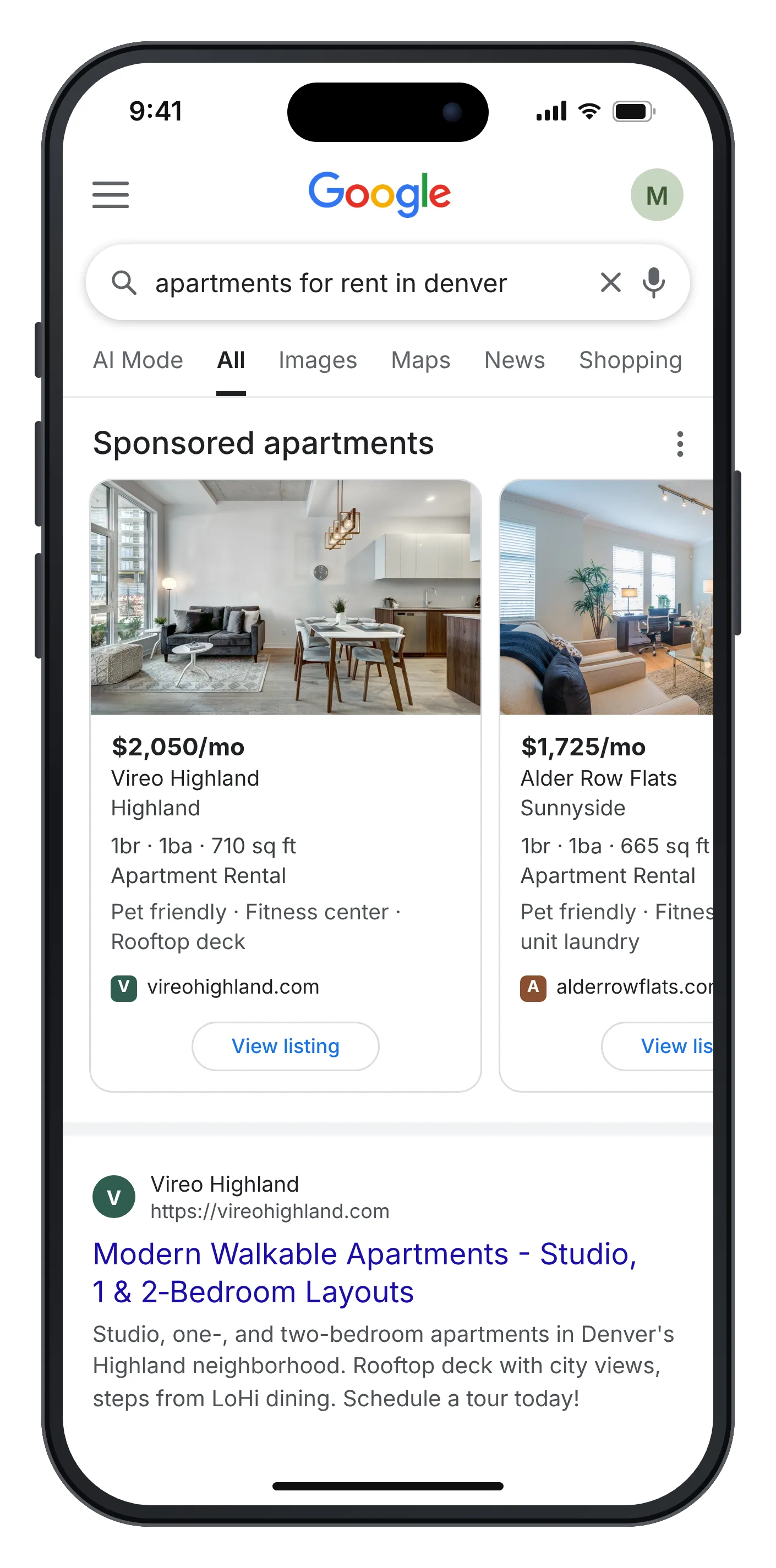
Each card is built from a structured feed of available units and can show:
- The unit’s photo
- Monthly rent
- Floor plan details such as beds, baths, and square footage
- Amenities and features, such as pet-friendly, in-unit laundry, or a fitness center
- The property name, neighborhood, and website
Google uses that feed data to match units to rental searches, the same way it matches products to shopping searches. A renter searching “1 bed apartments in Denver under $2,300 with in-unit laundry” can see apartments that fit what they are looking for before visiting an ILS or apartment website.
What Google Rental Ads Mean for Apartment Advertisers
Today, a renter clicks a search ad and then hunts for pricing and floor plans on the website. With Rental Ads, renters will have already seen the rent, photos, and layout before they click, so the people who click have screened themselves on the factors that can make or break a lead conversion. Our hypothesis is that renters who do click on these ads arrive better informed and potentially more likely to convert.
How Targeting and Bidding Work With Google Rental Ads
Unlike Search Ads, Rental Ads have no keywords to choose and no ad copy to write. Google matches units to searches using the feed itself: location, rent, beds, baths, amenities, and each unit’s title and description. The card is built from those same fields, so your unit data does the job your keywords and headlines do today.
What you do control:
- Location targeting. You set the parameters on the geographic areas you would like the ads to target.
- Which units show. You decide which units go in the feed. Leased units drop out with each daily update, and units opening soon can carry an availability date.
- Where the budget goes. Units can be grouped by property, floor plan, or a custom label such as “hard to lease,” then bid up or down by group. You can put more behind a slow-moving two-bedroom or an upcoming wave of move-outs, and spend less on the units that lease themselves.
Bidding works best when Google knows which clicks turn into leads. We track key event conversions (such as tour requests, applications, chat conversations, calls, direction requests) in Google Analytics 4 and assign a value to each action, so Google can bid toward the renters most likely to lease. With CRM access, signed leases can also be reported back to Google, giving it the clearest signal of all. Make sure to set this up before launching your Rental Ads campaign so it’s optimized from day one.
Should I move budget from Google Search Ads and Performance Max to fund Google Real Estate Rental Ads?
No. Each covers a different part of the renter’s search:
| Campaign | What it does | Role with Rental Ads |
|---|---|---|
| Paid Search | Text ads that capture searches for your property name, brand, and neighborhood | Keeps running; both can appear on the same results page |
| Performance Max | Reaches renters across YouTube, Display, Gmail, Discover, and Maps | Keeps running; Rental Ads aren’t available in Performance Max during the pilot |
| Google Rental Ads | Features individual available units through Shopping campaigns | Adds unit-level visibility on rental searches |
Additionally, Google Rental Ads and text ads can appear on the same results page, so a renter could see a Rental Ads carousel and a property’s search ad together. There will also be instances where Google will only show text ads when a search isn’t a strong match for rental listings or few eligible listings exist in that area.
We see Rental Ads as a supplemental strategy rather than a replacement for a comprehensive search advertising strategy. We recommend funding Rental Ads with new budget to start, rather than cutting a channel that’s already producing leases.
How You Should Measure Google Rental Ads
If renters screen units before they click, the number of website visits could fall while each visit carries more intent. So judge Rental Ads on what happens after the click:
- Tour requests, calls, and applications from Rental Ads clicks
- Cost per conversion, compared with your Search campaigns
- Which floor plans and price points earn the most and engagement
Conversion Logix Gets Early Access to Google’s Rental Ads Beta
Google selected Conversion Logix for its limited Rental Ads beta, and we’re working with Google and a group of participating properties to launch the first campaigns.
Our beta agenda focuses on three questions:
- How do renters engage with listing cards compared with text ads?
- Does seeing unit details before the click change conversion rates?
- How costly are clicks compared to other campaigns?
To run these ads well, the feed has to stay accurate. CLX connects unit-level inventory from each property’s management system (we integrate with a variety of systems including Yardi, Entrata, and RealPage) and keeps rent and availability current, so the ad doesn’t show a leased unit or an outdated price. Conversion tracking is set up before launch, so every result can be tied to tours and applications, not just clicks.
How to Get Ready for Google Rental Ads
Google hasn’t said when Rental Ads will open to all advertisers. But how quickly a property can launch will depend on how prepared it is to provide Google with live unit data.
The properties that launch fastest will be the ones that have the following:
- Unit pages on the website. Rental Ads send renters to a specific unit, not your homepage, so each available unit or floor plan needs a page showing the address, rent, and current availability.
- Pricing that matches everywhere. The rent on the ad and the landing page has to agree, including fixed monthly fees.
- Real photos. Use photos of the actual unit or building, with no logos, text overlays, or floor plan drawings.
- A live PMS connection. Leased units need to drop out, and new ones need to appear daily, so the ad never shows an old price.
- Conversion tracking. Then you can judge Rental Ads on the lead interactions that matter from day one, not just clicks.
Properties that get these in place now can launch as soon as access opens, instead of spending the first month getting these steps in place.
A New Way to Get Your Units in Front of Renters
The properties that benefit most from new formats are usually the ones that learn them first, with clean data and clear measurement in place. We’re starting that work now.
Interested in testing Google Rental Ads at your property? Talk to our team about beta opportunities, and subscribe to the CLX newsletter to see our findings from the initial tests as they come in.

For more on how Google is reshaping apartment search, read what apartment marketers need to know about Ask Maps and AI Max.